Appearance
S3 support
You can connect any S3-compatible storage service:
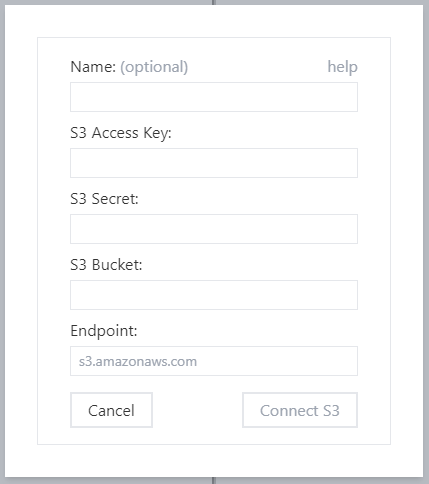
The important information:
- access key and secret are API keys needed to access
- you can use existing keys or generate keys just for Filerion (so that you have an option to revoke Filerion access)
- if you want to upload, make sure to enable write access
- bucket and endpoint identify the storage
- name is optional. We show it in the list of configured services
Configuring Amazon S3
To see your buckets visit https://s3.console.aws.amazon.com/s3/buckets
For endpoint you can use s3.amazonaws.com
To create access keys, visit https://us-east-1.console.aws.amazon.com/iam/home?region=us-east-1#/security_credentials (Access keys (access key ID and secret access key section)
Note: those links are valid as of 2022 June. Amazon might change their UI in the future.
S3 and directories
S3 (and compatible storage services) don’t have a concept of directory and therefore you can’t create an empty directory.
S3 is key / value object storage. The key is the name of the object.
Only by convention we consider / in key name to indicate a new directory.
To create an empty directory /foo/ we create a hidden file /foo/.filerion.keep.